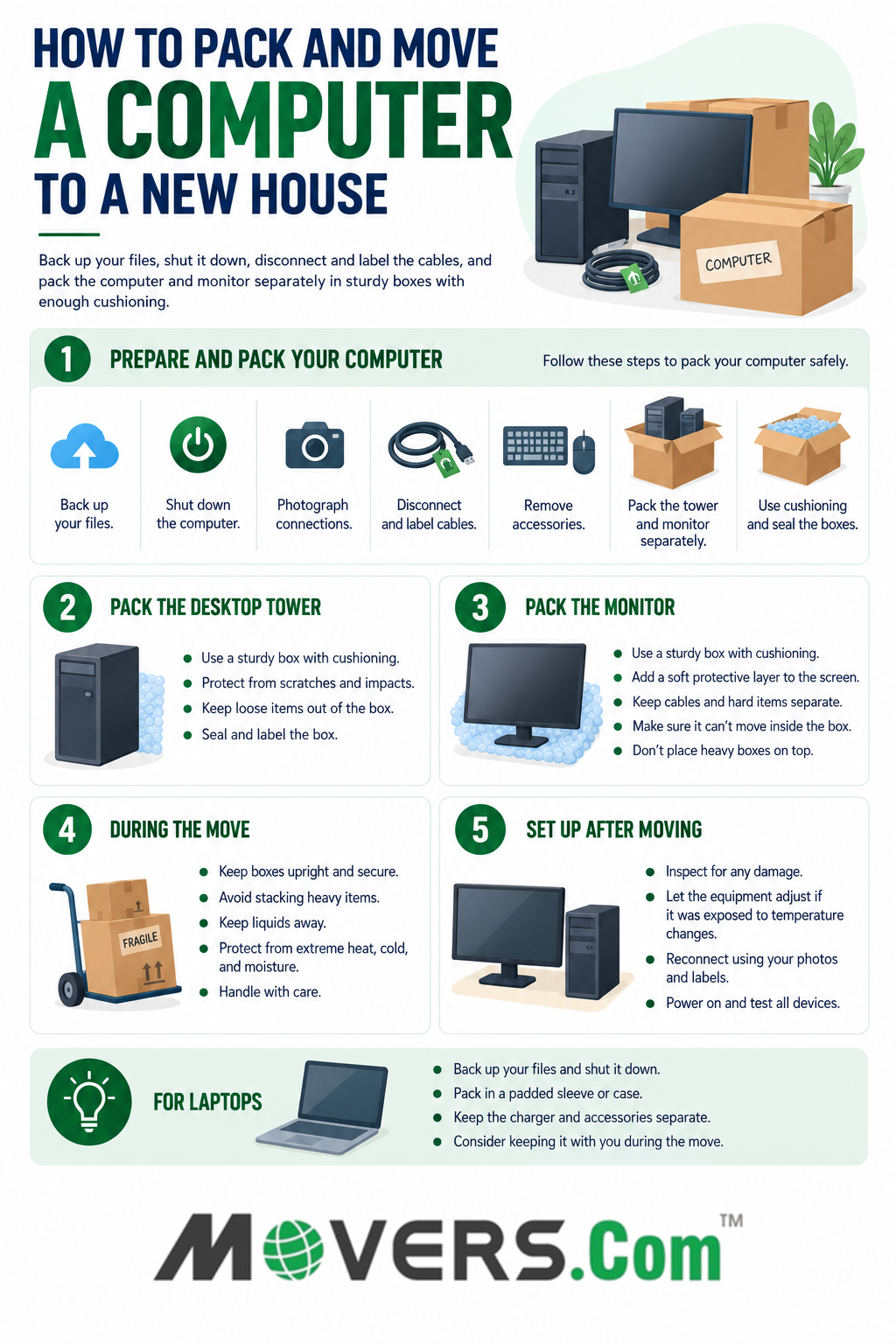
To move a computer safely, back up your files, shut it down, disconnect and label the cables, and pack the PC and monitor separately in sturdy boxes with enough cushioning to prevent movement.
Use the original boxes and fitted protective packaging if they're still in good condition. For long-distance moves, also protect computer equipment from moisture, extreme temperatures, and repeated handling.
How to Pack a Computer for Moving
Prepare your computer before packing it rather than simply disconnecting it and placing it in a box.
Follow these steps:
- Back up important files. Keep your backup separate from the computer so damage or loss during the move doesn't affect both copies.
- Shut down the computer. Properly shut down the PC before disconnecting power or accessories.
- Photograph the connections. Take pictures of the back of the computer and connected devices so you have a reference when setting everything up again.
- Disconnect and label the cables. Label cords by device or connection and keep them organized.
- Remove external accessories. Pack the keyboard, mouse, webcam, speakers, external drives, and other peripherals separately.
- Pack the tower and monitor separately. Use sturdy boxes and appropriate protective materials for each.
- Fill empty space with cushioning. Make sure the equipment can't shift significantly inside the boxes.
- Seal and label the boxes. Clearly identify boxes containing computer equipment so they can be handled carefully.
Keep cables and small accessories in labeled bags or containers rather than placing them loose against the computer or monitor.
How to Pack a Desktop Computer Tower
Pack a desktop computer tower securely so it can't shift significantly or take direct impacts during transportation.
If you still have the original box and fitted protective inserts and they're in good condition, consider using them. Otherwise:
- Choose a sturdy box with enough room for protective cushioning.
- Protect the tower's exterior from scratches and impacts.
- Place cushioning beneath and around the computer.
- Make sure the tower fits securely and doesn't move freely inside the box.
- Keep loose cables, tools, and other hard objects out of the box where they could strike or scratch the computer.
- Seal the box securely and label it as computer equipment.
Gaming PCs and other high-performance desktops may contain large graphics cards, heavy CPU coolers, tempered-glass panels, or other sensitive components that require additional precautions. Check the computer or component manufacturer's transportation instructions if you're unsure how the system should be prepared.
How to Pack a Computer Monitor for Moving
Pack your monitor separately and protect it from impacts, scratches, pressure, and movement inside the box.
The original monitor box with fitted protective packaging can be a good option if you still have it and it's in usable condition.
If you're using another box:
- Choose a sturdy box with room for protective material.
- Place a clean, soft protective layer against the screen.
- Add cushioning around the monitor.
- Keep cables and hard accessories away from the display.
- Fill empty spaces so the monitor doesn't shift significantly.
- Close and tape the box securely.
- Don't place heavy boxes or belongings on top of the monitor box.
If the monitor stand is designed to be removed, follow the manufacturer's instructions rather than forcing it apart.
Can You Use Bubble Wrap to Pack a Computer?
Yes, bubble wrap can provide additional cushioning, but it shouldn't be your only protection.
For a monitor, place a clean, soft protective layer against the screen before adding bubble wrap or other cushioning. Make sure the equipment can't move significantly inside the box.
If you're packing exposed internal computer components, use appropriate anti-static packaging rather than ordinary packing materials directly against sensitive electronics.
How to Move a PC to a New House
Once your PC is packed, keep the computer and monitor stable and protected throughout loading, transportation, and unloading.
During the move:
- Prevent computer boxes from sliding or tipping.
- Keep liquids away from computer equipment.
- Don't stack heavy belongings on computers or monitors.
- Limit exposure to excessive heat, cold, and moisture.
- Handle computer boxes carefully during loading and unloading.
If you're using professional movers, identify the boxes containing computer equipment and ask about their policies for transporting electronics.
For especially valuable or sensitive computer equipment, consider keeping it with you during the move when practical.
How to Move a PC Long Distance
When moving a PC long distance, secure packing is especially important because the computer may spend more time in transit and go through additional handling.
For a long-distance move:
- Use sturdy boxes with fitted or sufficient protective cushioning.
- Make sure the tower and monitor can't shift significantly inside their boxes.
- Protect computer equipment from moisture and extreme temperatures.
- Photograph valuable equipment before packing to document its condition.
- Check whether sensitive internal components require additional support during transport.
- Ask your moving company about its policies and packing requirements for computers and other electronics.
- Consider keeping especially valuable or sensitive equipment with you when practical.
Avoid leaving computer equipment in locations where it may be exposed to excessive heat, cold, moisture, or direct sunlight for extended periods.
How to Move a Gaming PC
Gaming PCs may need additional protection because they can contain large graphics cards, heavy CPU coolers, tempered-glass panels, and other sensitive components.
Before packing a gaming PC, shut it down, disconnect external devices, and check the computer or component manufacturer's transportation instructions.
If the PC contains large or unusually heavy internal components, follow the manufacturer's guidance on whether additional support or component removal is recommended.
Don't remove expensive internal components unless you're comfortable handling and reinstalling them correctly. If you're unsure, consider getting help from a qualified computer technician.
If the case has tempered-glass panels, protect them carefully from impacts and pressure during packing and transportation.
How to Pack a Laptop for Moving
Back up your files, shut the laptop down, disconnect accessories, and place it in a padded sleeve or protective case.
Pack the charger and other accessories so they don't press against or scratch the laptop. Keep the laptop protected from liquids, impacts, and extreme temperatures.
Since laptops are portable, consider keeping yours with you rather than loading it into the moving truck, especially if it contains important information or you'll need it soon after arriving.
Setting Up Your Computer After Moving
Inspect your computer and monitor before reconnecting and powering them on at your new home.
After unpacking:
- Inspect the equipment. Check the computer, monitor, cables, and accessories for visible damage or signs of moisture.
- Allow it to adjust if necessary. If the equipment was exposed to significant temperature changes, let it reach a suitable indoor environment and make sure there's no visible condensation before powering it on.
- Reconnect the equipment. Use your cable labels and photos to reconnect everything correctly.
- Power on and test the computer. Check that the monitor, keyboard, mouse, external drives, speakers, and other peripherals work properly.
If you notice significant physical damage or signs of moisture, don't power on the equipment until it can be appropriately evaluated.
Bottom Line
Back up your files, disconnect and label cables, pack the tower and monitor securely, and prevent computer equipment from shifting or being crushed during the move.
For gaming PCs and long-distance moves, take additional precautions with sensitive internal components, moisture, temperature, and repeated handling.
Editor's Note
Our comparison reviewed by our Moving Industry Analyst team is based on publicly available pricing, customer reviews, and regular moving scenarios.
Computer designs and manufacturer recommendations vary. Check the instructions for your computer, monitor, and components before packing or transporting expensive or sensitive equipment.
Get expert moving tips and compare movers for free at Movers.com.
You can get free moving quotes from licensed and insured movers, compare moving companies near you, and plan your move with confidence using our step-by-step moving guides and checklists.
Whether you're planning a local move, a long-distance relocation, or need help with packing and loading, Movers.com connects you with trusted moving professionals and practical tools to make moving easier and more affordable.
Questions? Talk to our moving specialists.